The Prototype Design Pattern: Copy Don't Create
Master the Prototype Pattern in Java. Learn how to clone objects efficiently instead of creating expensive instances from scratch.
Moshiour Rahman
The Problem: Expensive Object Creation
Imagine creating a DatabaseConnection object requires:
- Opening a socket (100ms)
- Authenticating (200ms)
- Loading configuration (50ms)
If you need 100 similar connections with slightly different configs, creating each from scratch takes 35 seconds total.
for (int i = 0; i < 100; i++) {
    DatabaseConnection conn = new DatabaseConnection(); // 350ms each!
    conn.setPort(8080 + i);
}
The Solution: The Prototype Pattern
The Prototype Pattern creates new objects by copying an existing object (prototype) instead of creating from scratch.
Real-Life Analogy: Xerox Machine 📄
Instead of writing 100 identical letters by hand:
- Write one perfect letter (the prototype)
- Photocopy it 100 times (each copy takes 2 seconds vs 5 minutes to write)
Result: 100 letters in 3 minutes instead of 8 hours.
Visualizing the Pattern
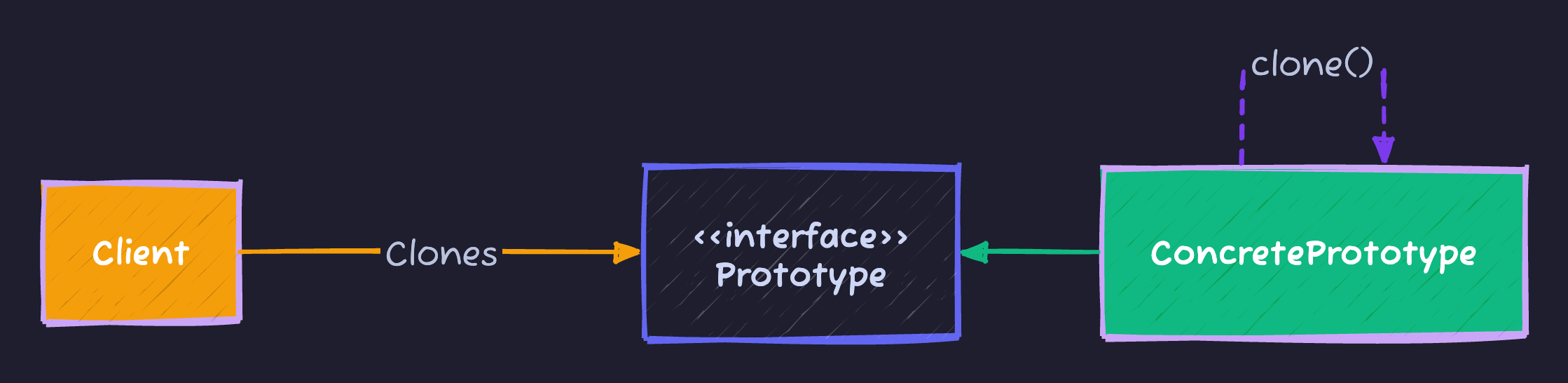
Implementation
1. The Prototype Interface
Java provides Cloneable interface, but we’ll make our own for clarity:
public interface Prototype {
    Prototype clone();
}
2. Concrete Prototype with Shallow Copy
public class Shape implements Cloneable {
    private String id;
    private String type;
    private int x, y;

    public Shape(String type) {
        this.type = type;
        // Expensive initialization
        loadFromDatabase();
    }

    private void loadFromDatabase() {
        // Simulating expensive operation
        System.out.println("Loading " + type + " from DB (500ms)...");
    }

    // Shallow clone
    @Override
    public Shape clone() {
        try {
            return (Shape) super.clone(); // Shallow copy
        } catch (CloneNotSupportedException e) {
            throw new RuntimeException(e);
        }
    }

    // Getters and setters
    public void setX(int x) { this.x = x; }
    public void setY(int y) { this.y = y; }
}
3. Deep Copy for Complex Objects
public class Employee implements Cloneable {
    private String name;
    private Address address; // Reference type!

    @Override
    public Employee clone() {
        try {
            Employee cloned = (Employee) super.clone();
            // Deep copy the address
            cloned.address = this.address.clone();
            return cloned;
        } catch (CloneNotSupportedException e) {
            throw new RuntimeException(e);
        }
    }
}

class Address implements Cloneable {
    private String street;
    private String city;

    @Override
    public Address clone() {
        try {
            return (Address) super.clone();
        } catch (CloneNotSupportedException e) {
            throw new RuntimeException(e);
        }
    }
}
Usage
// Expensive creation (once)
Shape circlePrototype = new Shape("Circle");
// Output: Loading Circle from DB (500ms)...

// Fast cloning (cheap)
Shape circle1 = circlePrototype.clone();
circle1.setX(10);

Shape circle2 = circlePrototype.clone();
circle2.setX(20);

// No database loading! Instant copies.
In The Wild (Real World Examples)
1. Object.clone() in Java
The classic example. Every object can override clone():
ArrayList<String> original = new ArrayList<>();
original.add("A");

ArrayList<String> copy = (ArrayList<String>) original.clone();
2. Spring Bean Scopes
Spring’s @Scope("prototype") creates a new bean instance by cloning a prototype:
@Component
@Scope("prototype")
public class PrototypeBean {
    // New instance returned each time
}
3. StringBuilder Copy Constructor
StringBuilder sb1 = new StringBuilder("Hello");
StringBuilder sb2 = new StringBuilder(sb1); // Copies content
Shallow vs Deep Copy
| Type | What It Copies | Use When |
|---|---|---|
| Shallow | Primitive fields + references (not content) | Objects with only primitives/immutables |
| Deep | Everything, including referenced objects | Objects contain mutable references |
Shallow Copy Pitfall
class Team implements Cloneable {
    String name;
    List<String> members; // Reference type

    @Override
    public Team clone() {
        return (Team) super.clone(); // SHALLOW - shares members list!
    }
}

Team team1 = new Team("Engineering");
team1.members.add("Alice");

Team team2 = team1.clone();
team2.members.add("Bob"); // Also adds to team1! 😱
Solution: Deep copy the list:
@Override
public Team clone() {
    Team cloned = (Team) super.clone();
    cloned.members = new ArrayList<>(this.members);
    return cloned;
}
Cheat Sheet
| Feature | Details |
|---|---|
| Category | Creational |
| Problem Solved | Expensive object creation, complex initialization |
| Key implementation | clone() method returns a copy |
| Pros | Performance (avoid expensive init), Flexibility (runtime configuration) |
| Cons | Complexity (deep vs shallow copy), Cloneable issues (checked exception) |
Tips to Remember 🧠
- “Xerox”: Think of photocopying instead of rewriting.
- “Shallow vs Deep”: Shallow copies references; deep copies content.
- Java Caveat:
Cloneableis a marker interface and throws checked exception. Consider copy constructors or factory methods as alternatives.
Moshiour Rahman
Software Architect & AI Engineer
Enterprise software architect with deep expertise in financial systems, distributed architecture, and AI-powered applications. Building large-scale systems at Fortune 500 companies. Specializing in LLM orchestration, multi-agent systems, and cloud-native solutions. I share battle-tested patterns from real enterprise projects.
Related Articles
The Visitor Design Pattern: Add Operations Without Modifying Classes
Master the Visitor Pattern in Java with practical examples. Add new operations to object structures without modifying existing classes using double dispatch.
JavaThe Observer Design Pattern: Don't Call Us, We'll Call You
Master the Observer Pattern in Java. Learn how to implement event-driven architectures and decouple data sources from listeners.
JavaThe Mediator Design Pattern: Centralize Complex Communications
Master the Mediator Pattern in Java. Learn how to reduce coupling by having objects communicate through a mediator instead of directly.
Comments
Comments are powered by GitHub Discussions.
Configure Giscus at giscus.app to enable comments.