The Interpreter Design Pattern: Build Your Own Language
Master the Interpreter Pattern in Java with working examples. Define grammar rules and evaluate expressions to build custom languages, DSLs, and rule engines.
Moshiour Rahman
The Problem: Evaluating Complex Expressions
Imagine you need to evaluate mathematical expressions like:
"3 + 5""10 - (2 * 3)""sum(1, 2, 3)"
You could use eval() in some languages, but that’s dangerous. You need to:
- Parse the expression into a structure
- Evaluate the structure
Doing this with if-else or regex becomes unmaintainable quickly.
The Solution: The Interpreter Pattern
The Interpreter Pattern defines a grammar for a language and provides an interpreter to process sentences in that language.
Real-Life Analogy: Calculator 🧮
A calculator interprets button presses:
- You press:
3,+,5,= - Calculator parses it into:
Add(3, 5) - Calculator evaluates:
8
The calculator has a grammar (numbers, operators) and an interpreter (evaluation logic).
Visualizing the Pattern
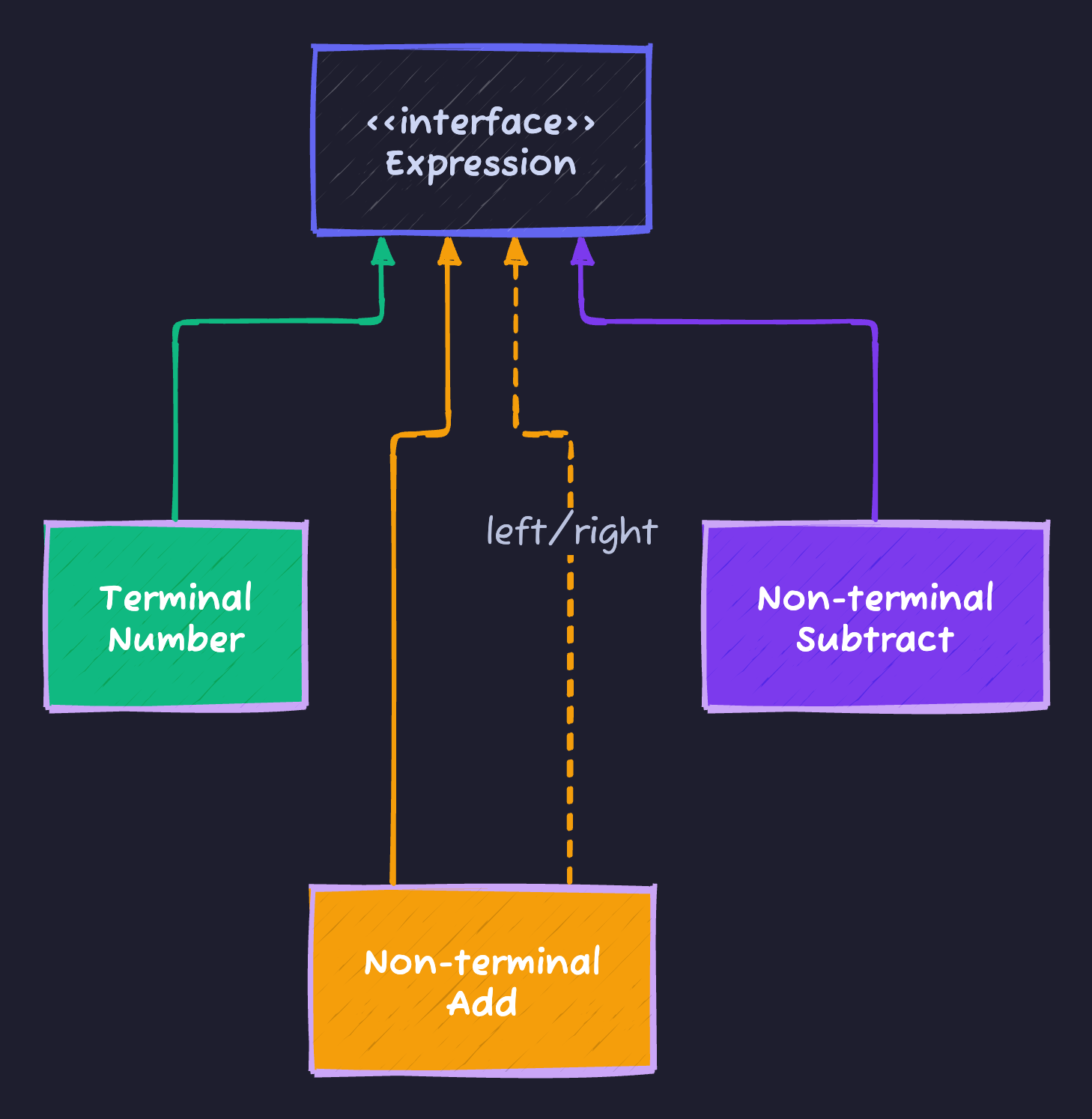
Implementation
1. The Expression Interface
// Abstract Expression
public interface Expression {
    int interpret();
}
2. Terminal Expressions (Leaf Nodes)
// Terminal: Numbers
public class NumberExpression implements Expression {
    private int number;

    public NumberExpression(int number) {
        this.number = number;
    }

    @Override
    public int interpret() {
        return number;
    }
}
3. Non-Terminal Expressions (Operators)
// Non-terminal: Addition
public class AddExpression implements Expression {
    private Expression left;
    private Expression right;

    public AddExpression(Expression left, Expression right) {
        this.left = left;
        this.right = right;
    }

    @Override
    public int interpret() {
        return left.interpret() + right.interpret();
    }
}

// Non-terminal: Subtraction
public class SubtractExpression implements Expression {
    private Expression left;
    private Expression right;

    public SubtractExpression(Expression left, Expression right) {
        this.left = left;
        this.right = right;
    }

    @Override
    public int interpret() {
        return left.interpret() - right.interpret();
    }
}
Usage
// Build expression tree for: "10 - (3 + 2)"
Expression expr = new SubtractExpression(
    new NumberExpression(10),
    new AddExpression(
        new NumberExpression(3),
        new NumberExpression(2)
    )
);

int result = expr.interpret();
System.out.println("Result: " + result); // 5
Real Parser Example
For a simple language like "x + 5" with variables:
public class VariableExpression implements Expression {
    private String variableName;

    public VariableExpression(String name) {
        this.variableName = name;
    }

    @Override
    public int interpret(Context context) {
        return context.getValue(variableName);
    }
}

// Context stores variable values
class Context {
    private Map<String, Integer> variables = new HashMap<>();

    public void setValue(String name, int value) {
        variables.put(name, value);
    }

    public int getValue(String name) {
        return variables.getOrDefault(name, 0);
    }
}

// Usage:
Context ctx = new Context();
ctx.setValue("x", 10);

Expression expr = new AddExpression(
    new VariableExpression("x"),
    new NumberExpression(5)
);

System.out.println(expr.interpret(ctx)); // 15
In The Wild (Real World Examples)
1. Regular Expressions
The Pattern class is an interpreter for regex grammar:
Pattern pattern = Pattern.compile("\\d+"); // Grammar
Matcher matcher = pattern.matcher("123"); // Interpret
2. SQL Parsers
Databases parse SQL into an AST and execute it:
SELECT * FROM users WHERE age > 18
-- Parsed into expression tree and executed
3. Spring Expression Language (SpEL)
ExpressionParser parser = new SpelExpressionParser();
Expression exp = parser.parseExpression("'Hello ' + 'World'");
String message = (String) exp.getValue(); // "Hello World"
When to Use Interpreter
✅ Use when:
- Grammar is simple
- Performance is not critical
- Need to evaluate expressions frequently (DSL, config)
❌ Don’t use when:
- Grammar is complex (use parser generators like ANTLR)
- Performance is critical (interpreter is slow)
Cheat Sheet
| Feature | Details |
|---|---|
| Category | Behavioral |
| Problem Solved | Evaluating sentences in a language/grammar |
| Key implementation | Expression tree + interpret() method |
| Pros | Extensibility (add new grammar rules easily) |
| Cons | Performance (tree traversal is slow), Complexity (for large grammars) |
Tips to Remember 🧠
- “Expression Tree”: Think of AST (Abstract Syntax Tree) in compilers.
- “Recursive”: Interpret is usually recursive (non-terminals call children’s interpret).
- “Rarely used in apps”: More common in compilers, parsers, DSLs than business apps.
Moshiour Rahman
Software Architect & AI Engineer
Enterprise software architect with deep expertise in financial systems, distributed architecture, and AI-powered applications. Building large-scale systems at Fortune 500 companies. Specializing in LLM orchestration, multi-agent systems, and cloud-native solutions. I share battle-tested patterns from real enterprise projects.
Related Articles
The Visitor Design Pattern: Add Operations Without Modifying Classes
Master the Visitor Pattern in Java with practical examples. Add new operations to object structures without modifying existing classes using double dispatch.
JavaThe Template Method Pattern: The Recipe for Success
Master the Template Method Pattern in Java. Learn how to define the skeleton of an algorithm in a superclass but let subclasses override specific steps.
JavaThe Strategy Design Pattern: Kill the If-Else Statements
Master the Strategy Pattern in Java. Learn how to replace complex if-else logic with interchangeable algorithms and follow the Open/Closed Principle.
Comments
Comments are powered by GitHub Discussions.
Configure Giscus at giscus.app to enable comments.