Gradle Multi-Module Projects: The Architecture That Scales From Startup to Enterprise
Stop copying code between projects. Learn how to structure Gradle multi-module projects that enforce boundaries, speed up builds, and make your codebase maintainable.
Moshiour Rahman
The Problem: The Growing Monolith
Your project started simple. One module, clean code, fast builds.
Then features happened.
my-app/
├── src/main/java/
│   ├── controller/       # 50 files
│   ├── service/          # 80 files
│   ├── repository/       # 40 files
│   ├── model/            # 100 files
│   ├── dto/              # 60 files
│   ├── util/             # 30 files
│   ├── config/           # 20 files
│   └── ...               # 200 more files
└── build.gradle          # One giant build file
Problems you’re now facing:
- Build takes 5 minutes (changed one file, recompile everything)
- Service layer accidentally imports controller classes (architectural violation)
- Team A breaks Team B’s code without realizing
- Can’t deploy just the API - it’s all tangled together
- Test suite runs 20 minutes (tests everything every time)
The Solution: Multi-Module Architecture
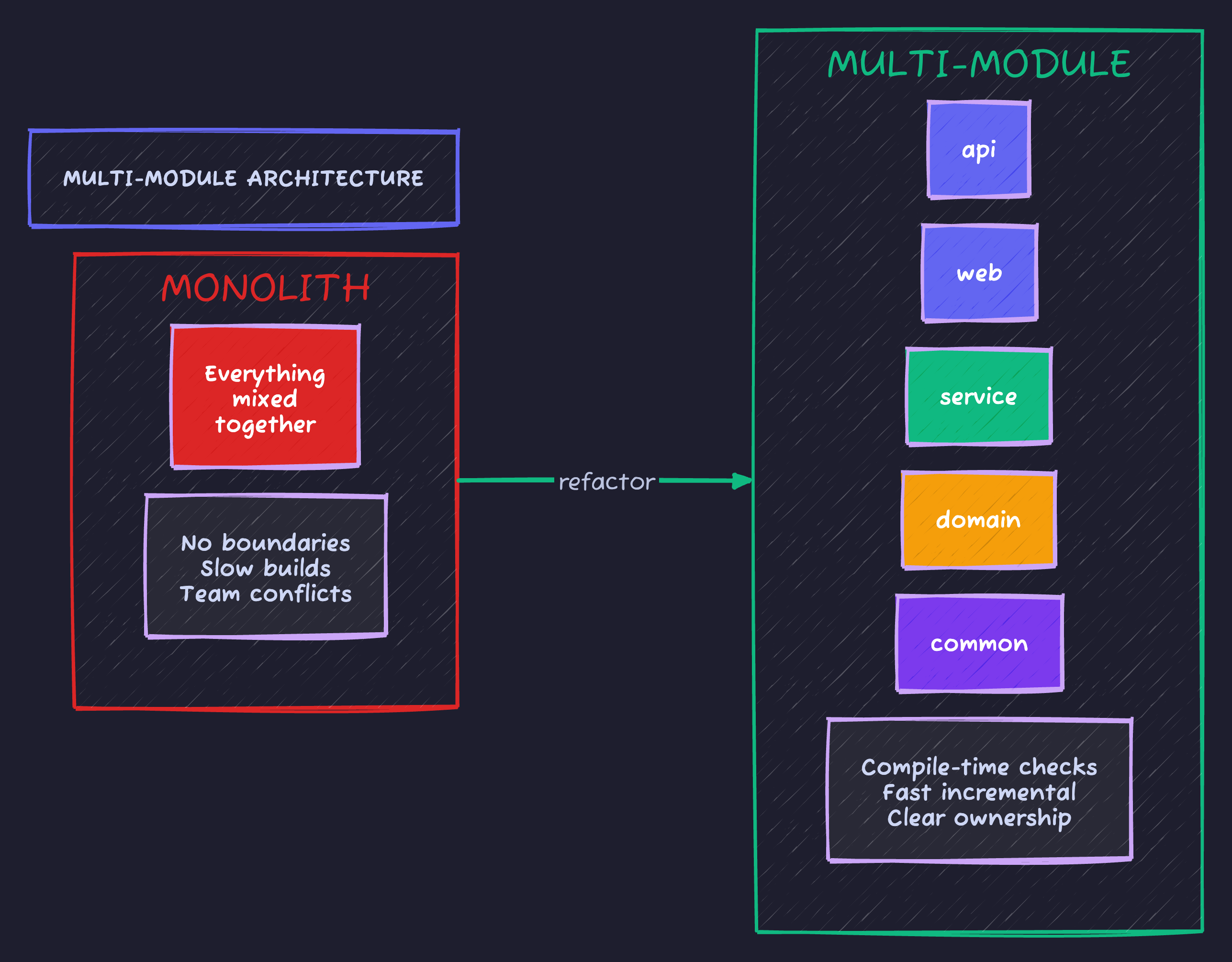
Benefits: Compile-time boundary enforcement, parallel builds, independent deployment, clear ownership.
Project Structure: The Clean Architecture Approach
my-app/
├── settings.gradle.kts           # Defines all modules
├── build.gradle.kts              # Root build config
├── gradle/
│   └── libs.versions.toml        # Centralized dependency versions
│
├── common/                       # Shared utilities, no business logic
│   ├── build.gradle.kts
│   └── src/main/java/
│       └── io/techyowls/common/
│           ├── exception/
│           └── util/
│
├── domain/                       # Business entities, zero dependencies
│   ├── build.gradle.kts
│   └── src/main/java/
│       └── io/techyowls/domain/
│           ├── user/
│           │   ├── User.java
│           │   └── UserRepository.java  # Interface only!
│           └── order/
│
├── service/                      # Business logic
│   ├── build.gradle.kts
│   └── src/main/java/
│       └── io/techyowls/service/
│           ├── user/
│           │   └── UserService.java
│           └── order/
│
├── infrastructure/               # Database, external services
│   ├── build.gradle.kts
│   └── src/main/java/
│       └── io/techyowls/infrastructure/
│           ├── persistence/
│           │   └── JpaUserRepository.java  # Implements domain interface
│           └── external/
│
├── api/                          # REST controllers
│   ├── build.gradle.kts
│   └── src/main/java/
│       └── io/techyowls/api/
│           ├── controller/
│           └── dto/
│
└── app/                          # Main application, wires everything
    ├── build.gradle.kts
    └── src/main/java/
        └── io/techyowls/
            └── Application.java
settings.gradle.kts: Define Your Modules
rootProject.name = "my-app"

include(
    "common",
    "domain",
    "service",
    "infrastructure",
    "api",
    "app"
)

// Enable type-safe project accessors (projects.common instead of project(":common"))
enableFeaturePreview("TYPESAFE_PROJECT_ACCESSORS")
gradle/libs.versions.toml: Centralized Dependencies
Why version catalogs? Before this, every module had different Spring versions. Chaos.
[versions]
spring-boot = "3.2.0"
java = "21"
lombok = "1.18.30"
mapstruct = "1.5.5.Final"

[libraries]
# Spring Boot starters
spring-boot-starter = { module = "org.springframework.boot:spring-boot-starter", version.ref = "spring-boot" }
spring-boot-starter-web = { module = "org.springframework.boot:spring-boot-starter-web", version.ref = "spring-boot" }
spring-boot-starter-data-jpa = { module = "org.springframework.boot:spring-boot-starter-data-jpa", version.ref = "spring-boot" }
spring-boot-starter-validation = { module = "org.springframework.boot:spring-boot-starter-validation", version.ref = "spring-boot" }
spring-boot-starter-test = { module = "org.springframework.boot:spring-boot-starter-test", version.ref = "spring-boot" }

# Database
postgresql = { module = "org.postgresql:postgresql" }
h2 = { module = "com.h2database:h2" }

# Tools
lombok = { module = "org.projectlombok:lombok", version.ref = "lombok" }
mapstruct = { module = "org.mapstruct:mapstruct", version.ref = "mapstruct" }
mapstruct-processor = { module = "org.mapstruct:mapstruct-processor", version.ref = "mapstruct" }

[bundles]
# Group related dependencies
spring-web = ["spring-boot-starter-web", "spring-boot-starter-validation"]
testing = ["spring-boot-starter-test"]

[plugins]
spring-boot = { id = "org.springframework.boot", version.ref = "spring-boot" }
spring-dependency-management = { id = "io.spring.dependency-management", version = "1.1.4" }
Root build.gradle.kts: Shared Configuration
plugins {
    java
    alias(libs.plugins.spring.boot) apply false
    alias(libs.plugins.spring.dependency.management) apply false
}

allprojects {
    group = "io.techyowls"
    version = "1.0.0"

    repositories {
        mavenCentral()
    }
}

subprojects {
    apply(plugin = "java")

    java {
        toolchain {
            languageVersion.set(JavaLanguageVersion.of(21))
        }
    }

    tasks.withType<JavaCompile> {
        options.encoding = "UTF-8"
        options.compilerArgs.addAll(listOf("-parameters"))
    }

    tasks.withType<Test> {
        useJUnitPlatform()
    }

    // Apply Spring dependency management to all modules
    apply(plugin = "io.spring.dependency-management")

    // Common dependencies for all modules
    dependencies {
        compileOnly(rootProject.libs.lombok)
        annotationProcessor(rootProject.libs.lombok)

        testImplementation(rootProject.libs.bundles.testing)
        testCompileOnly(rootProject.libs.lombok)
        testAnnotationProcessor(rootProject.libs.lombok)
    }
}
Module Build Files
common/build.gradle.kts
// No dependencies on other modules - this is the foundation
dependencies {
    // Only pure Java utilities
}
domain/build.gradle.kts
dependencies {
    implementation(project(":common"))

    // Domain should be framework-agnostic, but JPA annotations are pragmatic
    compileOnly(libs.spring.boot.starter.data.jpa)
}
service/build.gradle.kts
dependencies {
    implementation(project(":common"))
    implementation(project(":domain"))

    implementation(libs.spring.boot.starter)
    implementation(libs.spring.boot.starter.validation)
}
infrastructure/build.gradle.kts
dependencies {
    implementation(project(":common"))
    implementation(project(":domain"))

    implementation(libs.spring.boot.starter.data.jpa)
    runtimeOnly(libs.postgresql)
}
api/build.gradle.kts
dependencies {
    implementation(project(":common"))
    implementation(project(":domain"))
    implementation(project(":service"))

    implementation(libs.bundles.spring.web)

    // MapStruct for DTO mapping
    implementation(libs.mapstruct)
    annotationProcessor(libs.mapstruct.processor)
}
app/build.gradle.kts
plugins {
    alias(libs.plugins.spring.boot)
}

dependencies {
    // Wire all modules together
    implementation(project(":common"))
    implementation(project(":domain"))
    implementation(project(":service"))
    implementation(project(":infrastructure"))
    implementation(project(":api"))

    // Only the app module has the Spring Boot plugin
    implementation(libs.spring.boot.starter)

    testImplementation(libs.bundles.testing)
    testRuntimeOnly(libs.h2)
}

tasks.bootJar {
    archiveFileName.set("my-app.jar")
}
The Dependency Rule: Arrows Point Inward
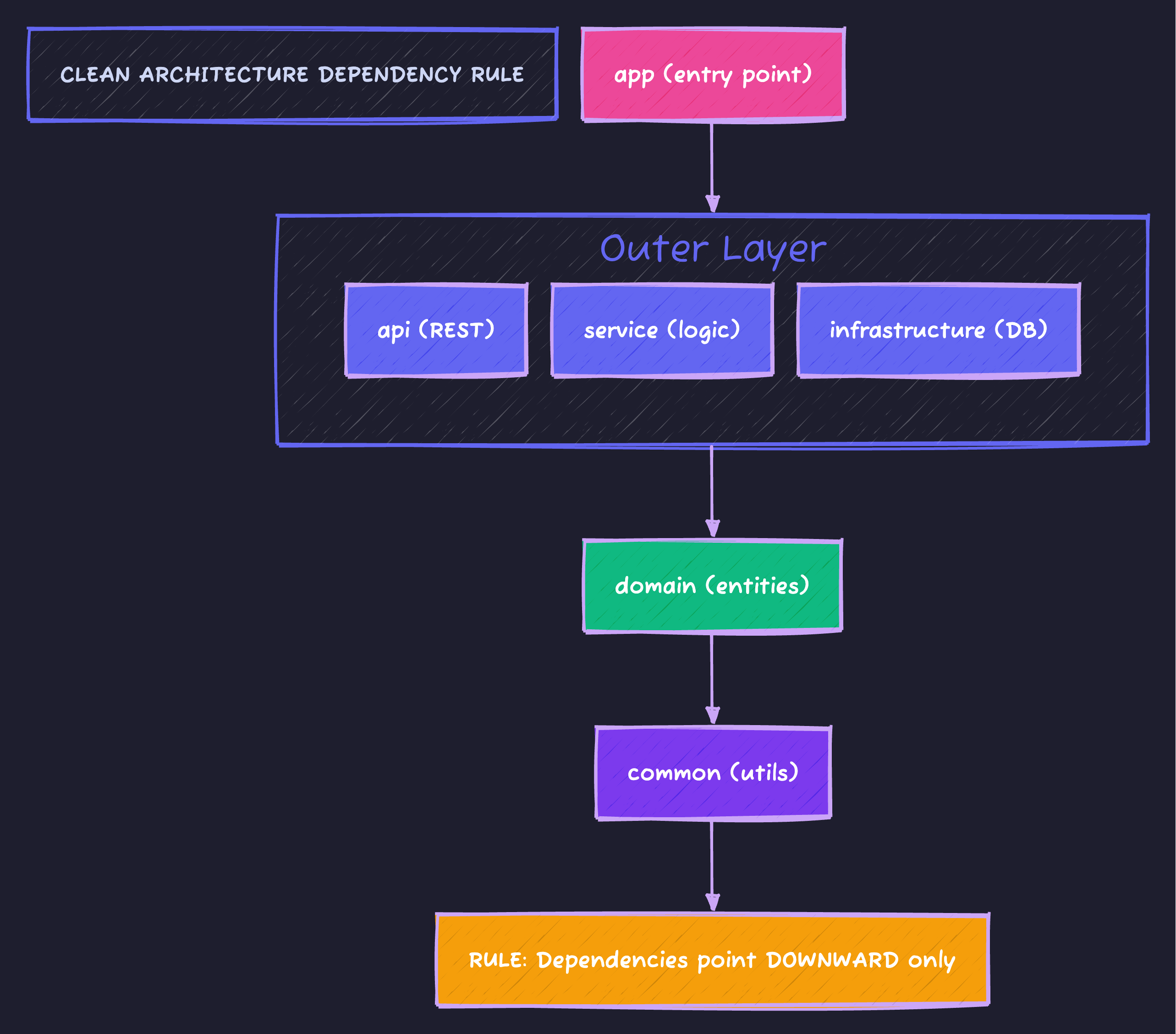
Gradle enforces this at compile time. If service tries to import from api, the build fails.
Real Example: User Domain
domain/src/…/user/User.java
package io.techyowls.domain.user;

import jakarta.persistence.*;
import java.time.Instant;

@Entity
@Table(name = "users")
public class User {
    @Id
    @GeneratedValue(strategy = GenerationType.IDENTITY)
    private Long id;

    @Column(nullable = false, unique = true)
    private String email;

    @Column(nullable = false)
    private String name;

    @Column(nullable = false)
    private Instant createdAt;

    // Getters, setters, constructors
}
domain/src/…/user/UserRepository.java
package io.techyowls.domain.user;

import java.util.Optional;

// Interface in domain - implementation in infrastructure
public interface UserRepository {
    User save(User user);
    Optional<User> findById(Long id);
    Optional<User> findByEmail(String email);
    boolean existsByEmail(String email);
}
infrastructure/src/…/persistence/JpaUserRepository.java
package io.techyowls.infrastructure.persistence;

import io.techyowls.domain.user.User;
import io.techyowls.domain.user.UserRepository;
import org.springframework.data.jpa.repository.JpaRepository;
import org.springframework.stereotype.Repository;

@Repository
public interface JpaUserRepository extends JpaRepository<User, Long>, UserRepository {
    // Spring Data JPA implements all methods automatically
}
service/src/…/user/UserService.java
package io.techyowls.service.user;

import io.techyowls.domain.user.User;
import io.techyowls.domain.user.UserRepository;
import org.springframework.stereotype.Service;
import org.springframework.transaction.annotation.Transactional;

@Service
@Transactional
public class UserService {

    private final UserRepository userRepository;  // Domain interface

    public UserService(UserRepository userRepository) {
        this.userRepository = userRepository;
    }

    public User createUser(String email, String name) {
        if (userRepository.existsByEmail(email)) {
            throw new IllegalArgumentException("Email already exists");
        }

        User user = new User();
        user.setEmail(email);
        user.setName(name);
        user.setCreatedAt(Instant.now());

        return userRepository.save(user);
    }
}
api/src/…/controller/UserController.java
package io.techyowls.api.controller;

import io.techyowls.api.dto.CreateUserRequest;
import io.techyowls.api.dto.UserResponse;
import io.techyowls.api.mapper.UserMapper;
import io.techyowls.service.user.UserService;
import jakarta.validation.Valid;
import org.springframework.http.HttpStatus;
import org.springframework.web.bind.annotation.*;

@RestController
@RequestMapping("/api/users")
public class UserController {

    private final UserService userService;
    private final UserMapper userMapper;

    public UserController(UserService userService, UserMapper userMapper) {
        this.userService = userService;
        this.userMapper = userMapper;
    }

    @PostMapping
    @ResponseStatus(HttpStatus.CREATED)
    public UserResponse createUser(@Valid @RequestBody CreateUserRequest request) {
        var user = userService.createUser(request.email(), request.name());
        return userMapper.toResponse(user);
    }
}
Build Performance: Parallel & Cached
gradle.properties
# Enable parallel execution
org.gradle.parallel=true

# Build cache - reuse outputs across builds
org.gradle.caching=true

# More memory for larger projects
org.gradle.jvmargs=-Xmx4g -XX:+HeapDumpOnOutOfMemoryError

# Configuration cache (Gradle 8+)
org.gradle.configuration-cache=true
Build Time Comparison
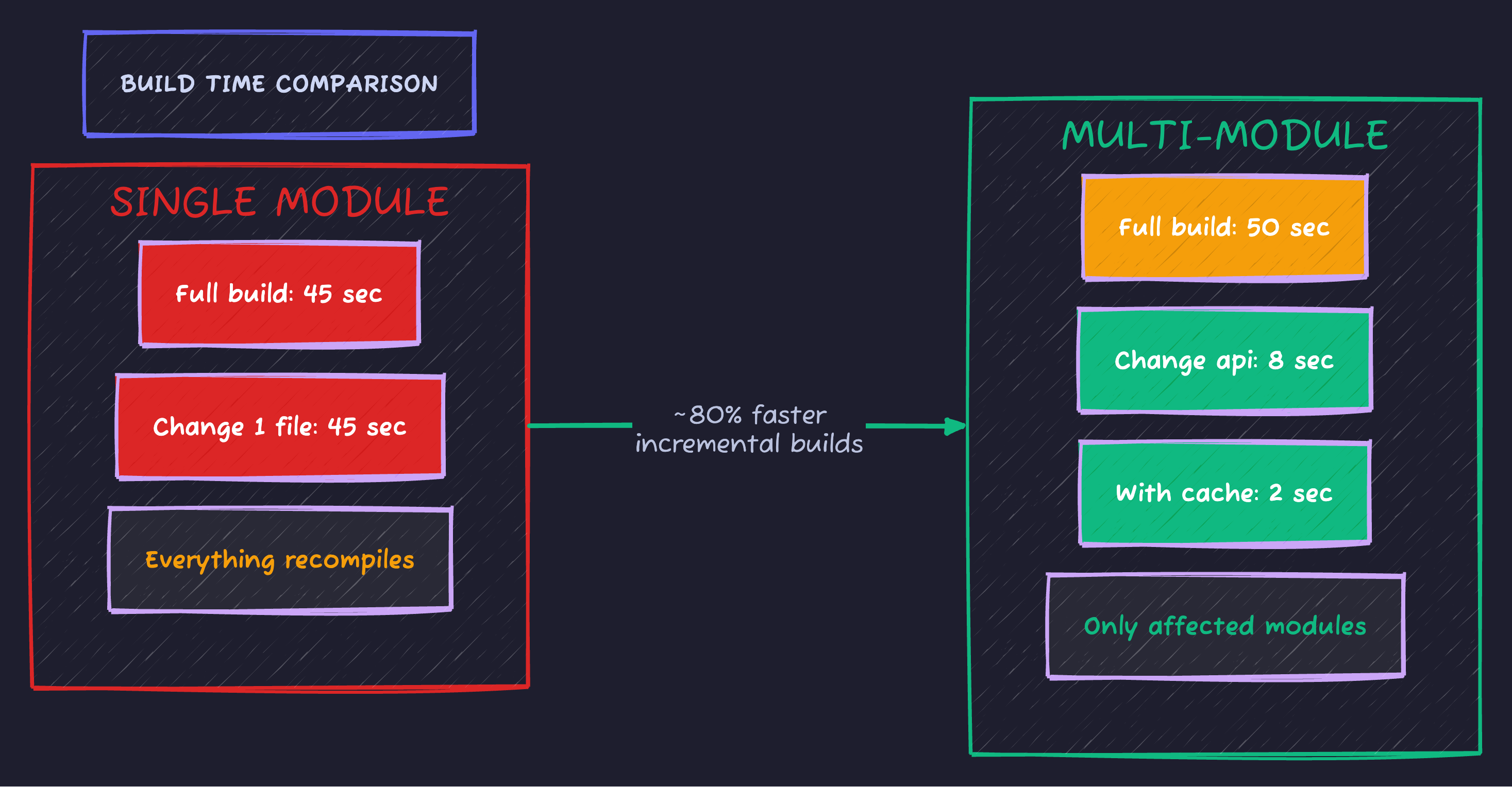
Multi-module wins when changes are isolated (most of the time), CI uses build cache, and teams work on different modules.
Testing: Module-Specific Tests
// infrastructure/build.gradle.kts
dependencies {
    testImplementation(libs.spring.boot.starter.test)
    testImplementation(libs.testcontainers.postgresql)
    testRuntimeOnly(libs.postgresql)
}
// infrastructure/src/test/.../JpaUserRepositoryTest.java
@DataJpaTest
@AutoConfigureTestDatabase(replace = AutoConfigureTestDatabase.Replace.NONE)
@Testcontainers
class JpaUserRepositoryTest {
@Container
@ServiceConnection
static PostgreSQLContainer<?> postgres = new PostgreSQLContainer<>("postgres:16-alpine");
@Autowired
private JpaUserRepository repository;
@Test
void shouldFindUserByEmail() {
// Test against real PostgreSQL
}
}# Run tests for single module (fast)
./gradlew :service:test
# Run all tests
./gradlew test
# Run only changed modules' tests
./gradlew test --build-cacheCommon Patterns
Pattern 1: Shared Test Fixtures
// domain/build.gradle.kts
plugins {
    `java-test-fixtures`  // Enable test fixtures
}
// domain/src/testFixtures/java/.../UserFixtures.java
public class UserFixtures {
public static User aUser() {
User user = new User();
user.setEmail("test@example.com");
user.setName("Test User");
user.setCreatedAt(Instant.now());
return user;
}
public static User aUser(String email) {
User user = aUser();
user.setEmail(email);
return user;
}
}// service/build.gradle.kts
dependencies {
testImplementation(testFixtures(project(":domain")))
}Pattern 2: API-Only Module for Clients
// Create a module with only DTOs and interfaces
// api-client/build.gradle.kts
dependencies {
    // No Spring dependencies - pure Java
    implementation(libs.jackson.annotations)
}
// api-client/src/.../UserApiClient.java
public interface UserApiClient {
UserResponse getUser(Long id);
UserResponse createUser(CreateUserRequest request);
}
// Other services can depend on api-client without pulling all of SpringPattern 3: Feature Modules
For larger apps, organize by feature instead of layer:
my-app/
├── core/                    # Shared domain, common
├── feature-user/            # User management
│   ├── user-api/
│   ├── user-service/
│   └── user-persistence/
├── feature-order/           # Order management
│   ├── order-api/
│   ├── order-service/
│   └── order-persistence/
└── app/
Migration Strategy: Monolith to Multi-Module
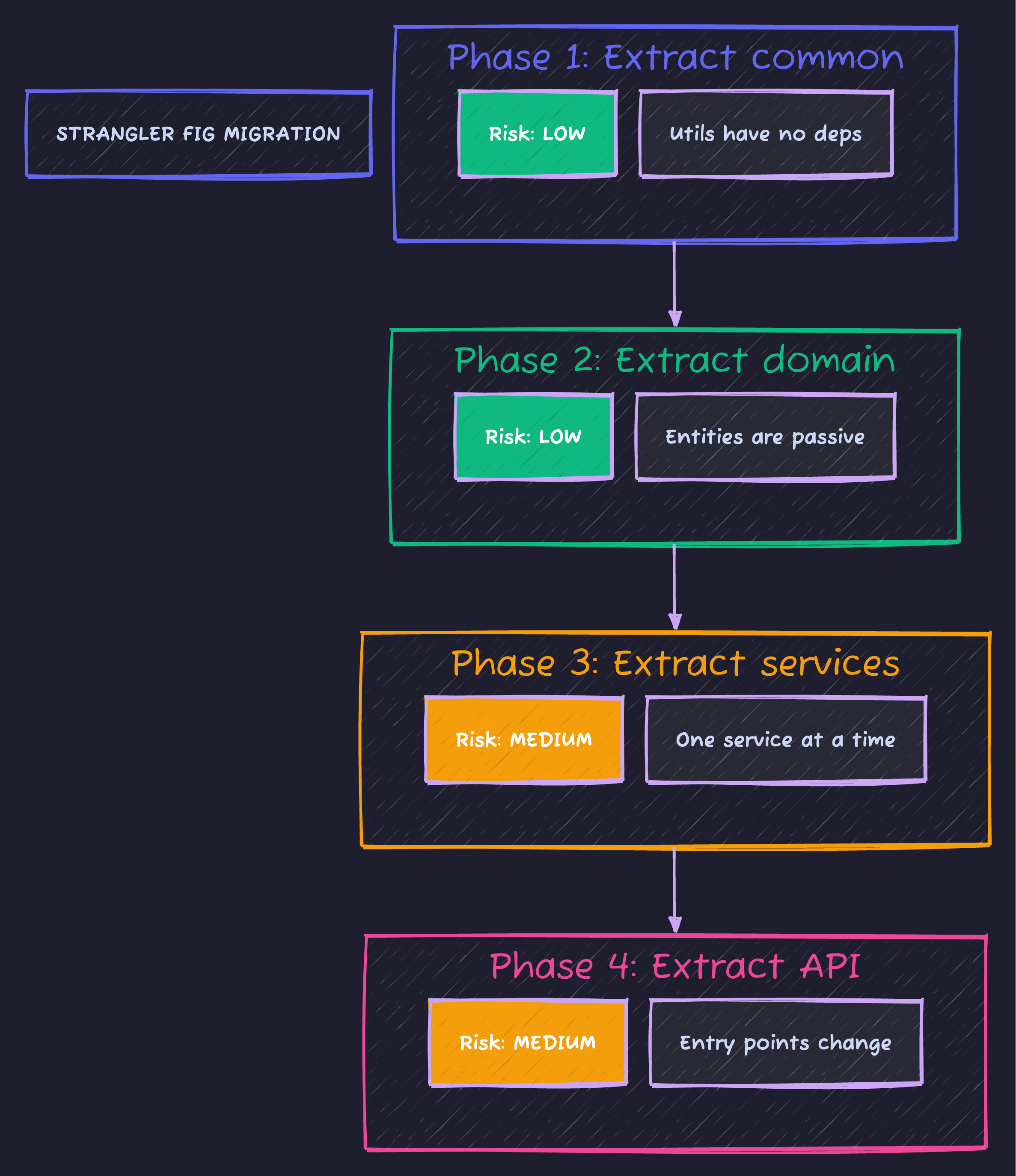
Key: Each phase is independently deployable. Start with low-risk extractions (common, domain), then tackle services.
Code Sample
Full working example: github.com/Moshiour027/techyowls-io-blog-public/gradle-multi-module
Summary
| Aspect | Single Module | Multi-Module |
|---|---|---|
| Setup complexity | Simple | Medium |
| Build time (incremental) | Slow | Fast |
| Boundary enforcement | None | Compile-time |
| Team scalability | Poor | Excellent |
| Deployment flexibility | All or nothing | Per-module |
Start multi-module when:
- Build exceeds 1 minute
- Team exceeds 3 developers
- You catch architectural violations in code review
- Different deployment needs emerge
Don’t over-engineer. Start with 3-4 modules (common, domain, service, app) and split only when needed.
Your future self will thank you.
Moshiour Rahman
Software Architect & AI Engineer
Enterprise software architect with deep expertise in financial systems, distributed architecture, and AI-powered applications. Building large-scale systems at Fortune 500 companies. Specializing in LLM orchestration, multi-agent systems, and cloud-native solutions. I share battle-tested patterns from real enterprise projects.
Related Articles
Spring Boot 3 + Spring AI: Build Production-Ready AI Apps in Java (2025 Complete Guide)
Master Spring AI for production. Build Java AI applications with OpenAI, Ollama, RAG systems, and vector search with working code and best practices.
JavaThe Visitor Design Pattern: Add Operations Without Modifying Classes
Master the Visitor Pattern in Java with practical examples. Add new operations to object structures without modifying existing classes using double dispatch.
JavaThe Template Method Pattern: The Recipe for Success
Master the Template Method Pattern in Java. Learn how to define the skeleton of an algorithm in a superclass but let subclasses override specific steps.
Comments
Comments are powered by GitHub Discussions.
Configure Giscus at giscus.app to enable comments.