FastAPI Tutorial Part 14: File Uploads and Storage
Handle file uploads in FastAPI with production-ready patterns. Learn form data, file validation, S3 cloud storage integration, and serving static files.
Moshiour Rahman
Basic File Upload
FastAPI uses UploadFile to handle uploads. Unlike bytes, UploadFile uses Python’s SpooledTemporaryFile, meaning it stores data in memory up to a limit and then spills to disk.
Upload Flow
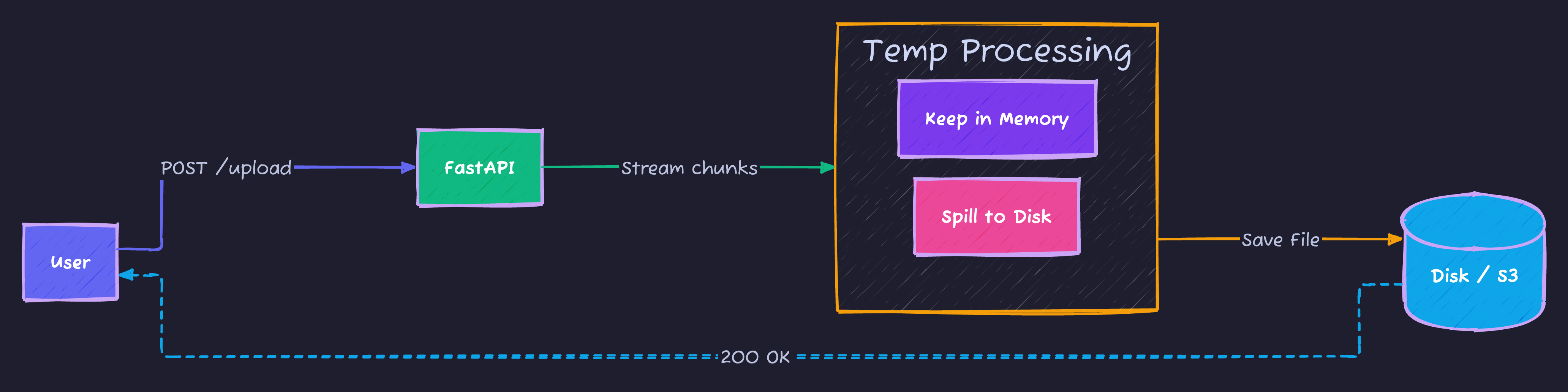
Simple Implementation
from fastapi import FastAPI, File, UploadFile

app = FastAPI()

@app.post("/upload")
async def upload_file(file: UploadFile = File(...)):
    # .read() loads entire file into RAM (Dangerous for large files!)
    # Use streaming for large files (see below)
    contents = await file.read()
    return {
        "filename": file.filename,
        "content_type": file.content_type,
        "size": len(contents)
    }
File Validation
from fastapi import HTTPException

ALLOWED_TYPES = ["image/jpeg", "image/png", "image/gif"]
MAX_SIZE = 5 * 1024 * 1024  # 5MB

@app.post("/upload/image")
async def upload_image(file: UploadFile = File(...)):
    if file.content_type not in ALLOWED_TYPES:
        raise HTTPException(400, "Invalid file type")

    contents = await file.read()
    if len(contents) > MAX_SIZE:
        raise HTTPException(400, "File too large")

    # Save file
    file_path = f"uploads/{file.filename}"
    with open(file_path, "wb") as f:
        f.write(contents)

    return {"path": file_path}
Multiple Files
from typing import List

@app.post("/upload/multiple")
async def upload_multiple(files: List[UploadFile] = File(...)):
    results = []
    for file in files:
        contents = await file.read()
        results.append({
            "filename": file.filename,
            "size": len(contents)
        })
    return {"files": results}
Form Data with Files
from fastapi import Form

@app.post("/upload/profile")
async def upload_profile(
    name: str = Form(...),
    email: str = Form(...),
    avatar: UploadFile = File(...)
):
    # Save avatar
    path = f"avatars/{avatar.filename}"
    with open(path, "wb") as f:
        content = await avatar.read()
        f.write(content)

    return {
        "name": name,
        "email": email,
        "avatar_path": path
    }
AWS S3 Integration (Streaming)
Uploading large files directly to memory (file.read()) creates memory spikes. Instead, stream the file directly from the request to S3 using upload_fileobj.
import boto3
from botocore.exceptions import ClientError
import uuid

s3_client = boto3.client(
    "s3",
    aws_access_key_id="YOUR_KEY",
    aws_secret_access_key="YOUR_SECRET",
    region_name="us-east-1"
)

BUCKET_NAME = "my-bucket"

@app.post("/upload/s3")
async def upload_to_s3(file: UploadFile = File(...)):
    file_key = f"uploads/{uuid.uuid4()}-{file.filename}"

    try:
        # ✅ STREAMING: Passes the file-like object directly to S3
        # No large memory buffer required
        s3_client.upload_fileobj(
            file.file,
            BUCKET_NAME,
            file_key,
            ExtraArgs={"ContentType": file.content_type}
        )

        url = f"https://{BUCKET_NAME}.s3.amazonaws.com/{file_key}"
        return {"url": url, "key": file_key}

    except ClientError as e:
        raise HTTPException(500, f"Upload failed: {str(e)}")
    finally:
        # Always close the file handle
        await file.close()
Serving Static Files
from fastapi.staticfiles import StaticFiles

app.mount("/static", StaticFiles(directory="static"), name="static")
app.mount("/uploads", StaticFiles(directory="uploads"), name="uploads")
Complete Example
from fastapi import FastAPI, File, UploadFile, HTTPException
from typing import List
import os
import uuid
import aiofiles

app = FastAPI()

UPLOAD_DIR = "uploads"
os.makedirs(UPLOAD_DIR, exist_ok=True)

ALLOWED_EXTENSIONS = {".jpg", ".jpeg", ".png", ".gif", ".pdf"}
MAX_FILE_SIZE = 10 * 1024 * 1024

def validate_file(file: UploadFile):
    ext = os.path.splitext(file.filename)[1].lower()
    if ext not in ALLOWED_EXTENSIONS:
        raise HTTPException(400, f"File type {ext} not allowed")

async def save_file(file: UploadFile) -> str:
    validate_file(file)

    ext = os.path.splitext(file.filename)[1]
    unique_name = f"{uuid.uuid4()}{ext}"
    file_path = os.path.join(UPLOAD_DIR, unique_name)

    async with aiofiles.open(file_path, "wb") as f:
        content = await file.read()
        if len(content) > MAX_FILE_SIZE:
            raise HTTPException(400, "File too large")
        await f.write(content)

    return unique_name

@app.post("/files/upload")
async def upload_file(file: UploadFile = File(...)):
    filename = await save_file(file)
    return {"filename": filename, "url": f"/uploads/{filename}"}

@app.post("/files/upload-multiple")
async def upload_multiple(files: List[UploadFile] = File(...)):
    results = []
    for file in files:
        filename = await save_file(file)
        results.append({"filename": filename})
    return {"files": results}
Summary
| Feature | Method |
|---|---|
| Single file | UploadFile = File(...) |
| Multiple files | List[UploadFile] = File(...) |
| With form data | Combine Form() and File() |
| Cloud storage | boto3 for S3 |
Next Steps
In Part 15, we’ll explore Testing FastAPI Applications - writing comprehensive tests for your API.
Series Navigation:
- Part 1-13: Previous parts
- Part 14: File Uploads (You are here)
- Part 15: Testing
Moshiour Rahman
Software Architect & AI Engineer
Enterprise software architect with deep expertise in financial systems, distributed architecture, and AI-powered applications. Building large-scale systems at Fortune 500 companies. Specializing in LLM orchestration, multi-agent systems, and cloud-native solutions. I share battle-tested patterns from real enterprise projects.
Related Articles
FastAPI Tutorial Part 20: Building a Production-Ready API
Build a complete production-ready FastAPI application. Combine all concepts into a real-world e-commerce API with authentication, database, and deployment.
PythonFastAPI Tutorial Part 19: OpenAPI and API Documentation
Create professional API documentation with FastAPI. Learn OpenAPI customization, Swagger UI, ReDoc, and documentation best practices.
PythonFastAPI Tutorial Part 16: Docker and Deployment
Deploy FastAPI applications to production. Learn Docker containerization, Docker Compose, cloud deployment, and production best practices.
Comments
Comments are powered by GitHub Discussions.
Configure Giscus at giscus.app to enable comments.