The Builder Design Pattern: The Cure for Constructor Headache
Master the Builder Pattern in Java. Learn how to construct complex objects step-by-step, avoid telescoping constructors, and write readable code.
Moshiour Rahman
The Problem: Telescoping Constructor Hell
Imagine you are building a User class. Initially, it just needs a firstName and lastName. Easy.
public User(String firstName, String lastName) { ... }But then requirements change. You need email, phone, address, age, and isActive. Some are optional, some are required. You end up with this mess:
// The "Telescoping Constructor" Anti-Pattern
public User(String firstName, String lastName) { ... }
public User(String firstName, String lastName, String email) { ... }
public User(String firstName, String lastName, String email, String phone) { ... }
public User(String firstName, String lastName, String email, String phone, String address) { ... }
...
And calling it is a nightmare:
// What does "true" mean? Which string is the phone number?
User user = new User("John", "Doe", null, "123 Main St", 25, true);
This is unreachable, unreadable, and error-prone.
The Solution: The Builder Pattern
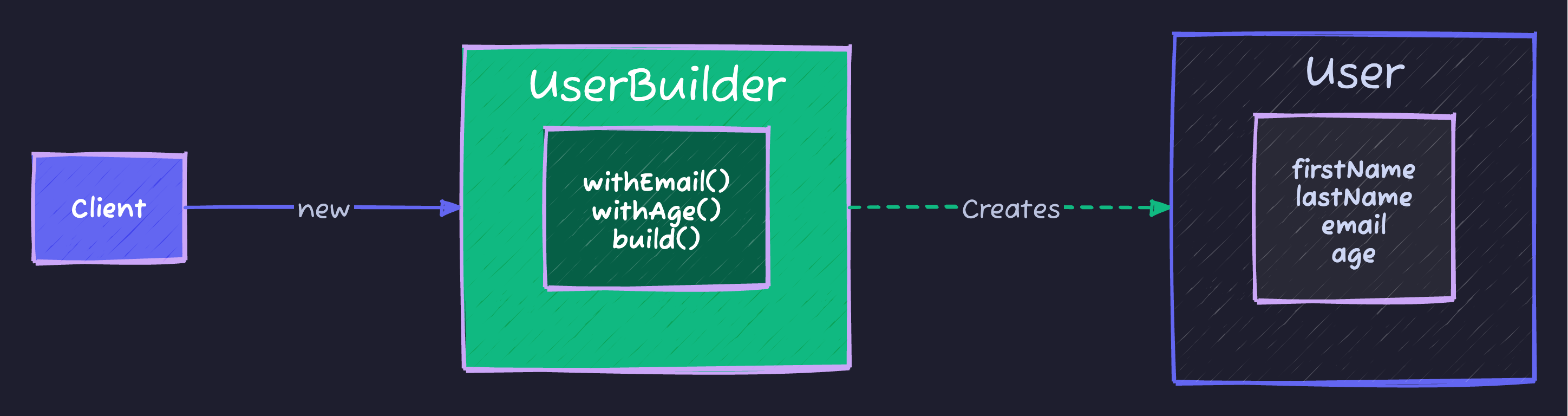
The Builder Pattern separates the construction of a complex object from its representation. It allows you to construct complex objects step-by-step.
Real-Life Analogy: Ordering at Subway 🥪
Think about ordering a sandwich at Subway:
- Bread: “Start with Italian Herbs and Cheese.”
- Meat: “Add Turkey.”
- Cheese: “Add Provolone.”
- Veggies: “No onions, extra pickles.”
- Sauce: “Mayo.”
You don’t just grab a random pre-made sandwich. You build it step-by-step. The final result is a Sandwich object, but the process was flexible.
Visualizing the Pattern
Implementation
In Java, we typically implement this using a Static Inner Class.
public class User {
    // All fields are distinct (often final/immutable)
    private final String firstName; // Required
    private final String lastName;  // Required
    private final int age;          // Optional
    private final String phone;     // Optional
    private final String address;   // Optional

    // Private constructor: only the Builder can call this
    private User(UserBuilder builder) {
        this.firstName = builder.firstName;
        this.lastName = builder.lastName;
        this.age = builder.age;
        this.phone = builder.phone;
        this.address = builder.address;
    }

    // Getters only (Immutability!)
    public String getFirstName() { return firstName; }
    // ... other getters ...

    // Static Inner Builder Class
    public static class UserBuilder {
        private final String firstName;
        private final String lastName;
        private int age = 0;           // Default value
        private String phone = null;
        private String address = null;

        // Constructor for Required Parameters
        public UserBuilder(String firstName, String lastName) {
            this.firstName = firstName;
            this.lastName = lastName;
        }

        // Methods for Optional Parameters
        // Using "Fluent Interface" (returning this)
        public UserBuilder age(int age) {
            this.age = age;
            return this;
        }

        public UserBuilder phone(String phone) {
            this.phone = phone;
            return this;
        }

        public UserBuilder address(String address) {
            this.address = address;
            return this;
        }

        // The logic to build the final object
        public User build() {
            // Validate logic here if needed
            if (this.age < 0) throw new IllegalStateException("Age cannot be negative");

            return new User(this);
        }
    }
}
Using Code
Clean, readable, and flexible:
User user = new User.UserBuilder("John", "Doe")
    .age(30)
    .phone("555-0199")
    // .address() is skipped (optional)
    .build();
In The Wild (Real World Examples)
You use this pattern every day without realizing it.
1. java.lang.StringBuilder
It’s in the name!
String s = new StringBuilder()
    .append("Design ")
    .append("Patterns ")
    .append("are cool.")
    .toString(); // .toString() is effectively .build()
2. Lombok @Builder
In modern Java development, you rarely write the boilerplate above manually. You use Lombok:
import lombok.Builder;

@Builder
public class User {
    private String firstName;
    private String lastName;
    // ...
}

// Usage is automatically generated:
User.builder().firstName("John").build();
Cheat Sheet
| Feature | Details |
|---|---|
| Category | Creational |
| Problem Solved | Complex object creation, Constructor Hell |
| Key Keyword | .build() |
| Signature Look | Method chaining: obj.a().b().c().build() |
| Pros | Readable, Immutable objects, clear separation of required vs optional |
| Cons | Verbose (requires creating a separate Builder class) |
Tips to Remember 🧠
- “Restaurant Order”: When you order food, you specify options one by one. That’s a Builder.
- “Method Chaining”: If you see dots connecting method calls on new lines, it’s likely a Builder (or Stream).
- Immutability: Use Builder when you want your final object to be Immutable (no setters) but construction is complex.
Moshiour Rahman
Software Architect & AI Engineer
Enterprise software architect with deep expertise in financial systems, distributed architecture, and AI-powered applications. Building large-scale systems at Fortune 500 companies. Specializing in LLM orchestration, multi-agent systems, and cloud-native solutions. I share battle-tested patterns from real enterprise projects.
Related Articles
The Factory Method Pattern: Decoupling Object Creation
Master the Factory Method Pattern in Java. Learn how to loosen coupling in your code by letting subclasses decide which objects to instantiate.
JavaThe Visitor Design Pattern: Add Operations Without Modifying Classes
Master the Visitor Pattern in Java with practical examples. Add new operations to object structures without modifying existing classes using double dispatch.
JavaThe Strategy Design Pattern: Kill the If-Else Statements
Master the Strategy Pattern in Java. Learn how to replace complex if-else logic with interchangeable algorithms and follow the Open/Closed Principle.
Comments
Comments are powered by GitHub Discussions.
Configure Giscus at giscus.app to enable comments.