Spring Boot Profiles & Configuration: The Art of Environment Management
Master Spring Boot profiles, externalized configuration, secrets management, and 12-factor app principles. Manage dev, staging, and production environments.
Moshiour Rahman
The Configuration Problem
Your app needs different settings for different environments:
| Setting | Development | Staging | Production |
|---|---|---|---|
| Database | localhost:5432 | staging-db.internal | prod-db.cluster |
| Log level | DEBUG | INFO | WARN |
| Cache TTL | 60s | 300s | 3600s |
| API keys | test_key | staging_key | REAL_KEY |
The wrong way: If-else statements everywhere, hardcoded values, .properties files committed with secrets.
The right way: Externalized configuration with profiles.
The Configuration Hierarchy
Spring Boot loads configuration from multiple sources in a specific order. Higher sources override lower ones:
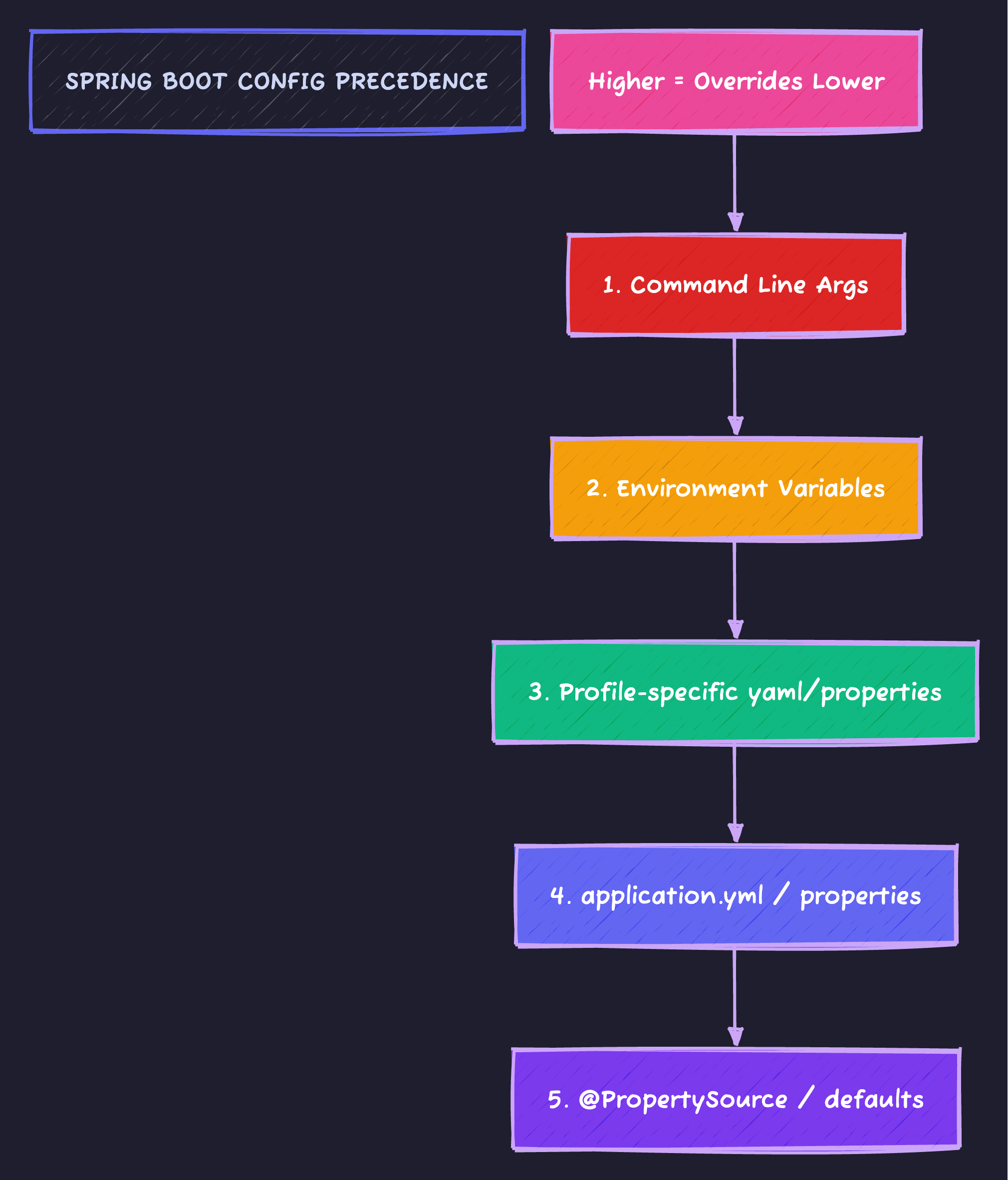
Command line args beat environment variables, which beat profile-specific YAML, which beats the base application.yml.
Basic Profile Setup
application.yml (Base configuration)
spring:
  application:
    name: my-service

server:
  port: 8080

app:
  name: My Service
  feature:
    new-dashboard: false  # Feature flag default
application-dev.yml
spring:
  datasource:
    url: jdbc:postgresql://localhost:5432/myapp_dev
    username: dev_user
    password: dev_password

logging:
  level:
    root: INFO
    io.techyowls: DEBUG
    org.hibernate.SQL: DEBUG

app:
  feature:
    new-dashboard: true  # Enable in dev for testing
application-prod.yml
spring:
  datasource:
    url: ${DATABASE_URL}  # From environment variable
    username: ${DATABASE_USER}
    password: ${DATABASE_PASSWORD}

logging:
  level:
    root: WARN
    io.techyowls: INFO

server:
  tomcat:
    max-threads: 200
Activating Profiles
# Command line
java -jar app.jar --spring.profiles.active=prod

# Environment variable
export SPRING_PROFILES_ACTIVE=prod
java -jar app.jar

# In application.yml (default profile)
spring:
  profiles:
    active: dev

# Multiple profiles
java -jar app.jar --spring.profiles.active=prod,metrics,ssl
Profile Groups (Spring Boot 2.4+)
# application.yml
spring:
  profiles:
    group:
      production:
        - prod
        - ssl
        - metrics
      development:
        - dev
        - debug
        - mock-services
# Activates: prod + ssl + metrics
java -jar app.jar --spring.profiles.active=productionConditional Beans
@Configuration
public class DataSourceConfig {

    @Bean
    @Profile("dev")
    public DataSource devDataSource() {
        // In-memory H2 for development
        return new EmbeddedDatabaseBuilder()
            .setType(EmbeddedDatabaseType.H2)
            .build();
    }

    @Bean
    @Profile("prod")
    public DataSource prodDataSource(
        @Value("${spring.datasource.url}") String url,
        @Value("${spring.datasource.username}") String username,
        @Value("${spring.datasource.password}") String password
    ) {
        HikariDataSource ds = new HikariDataSource();
        ds.setJdbcUrl(url);
        ds.setUsername(username);
        ds.setPassword(password);
        ds.setMaximumPoolSize(20);
        return ds;
    }

    @Bean
    @Profile("!prod")  // NOT production
    public DatabaseInitializer testDataInitializer() {
        return new DatabaseInitializer();  // Seeds test data
    }
}
Type-Safe Configuration with @ConfigurationProperties
@ConfigurationProperties(prefix = "app")
@Validated
public class AppProperties {

    @NotBlank
    private String name;

    private final Feature feature = new Feature();
    private final Security security = new Security();

    public static class Feature {
        private boolean newDashboard = false;
        private boolean betaApi = false;
        // Getters and setters
    }

    public static class Security {
        @NotBlank
        private String jwtSecret;

        @Min(3600)
        private int tokenExpirationSeconds = 3600;
        // Getters and setters
    }

    // Getters and setters
}@Configuration
@EnableConfigurationProperties(AppProperties.class)
public class AppConfig {
}@Service
public class FeatureService {
private final AppProperties appProperties;
public FeatureService(AppProperties appProperties) {
this.appProperties = appProperties;
}
public boolean isNewDashboardEnabled() {
return appProperties.getFeature().isNewDashboard();
}
}Environment Variables Best Practices
Spring Boot uses relaxed binding to convert YAML properties to environment variables:
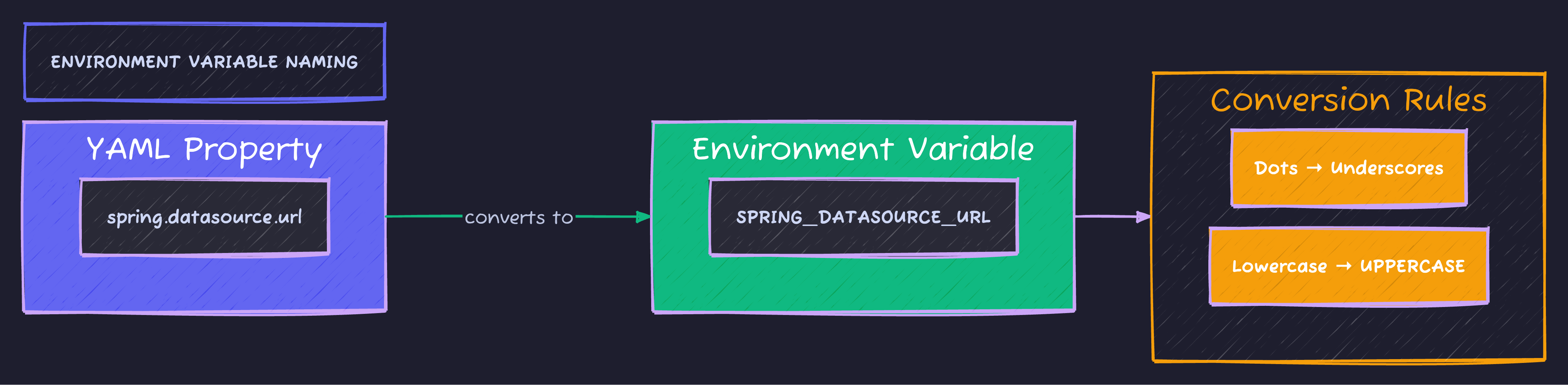
Replace dots with underscores, convert to UPPERCASE. spring.datasource.url becomes SPRING_DATASOURCE_URL. Spring automatically binds all variations.
Secrets Management
Never commit secrets to Git. Here are proper approaches:
Option 1: Environment Variables
# application-prod.yml
spring:
  datasource:
    password: ${DATABASE_PASSWORD}  # From environment

app:
  security:
    jwt-secret: ${JWT_SECRET}
    api-key: ${EXTERNAL_API_KEY}
# Set in deployment environment
export DATABASE_PASSWORD="super-secret-password"
export JWT_SECRET="$(openssl rand -base64 64)"Option 2: External Config File
# /etc/myapp/secrets.yml (not in Git)
spring:
  datasource:
    password: actual-password

app:
  security:
    jwt-secret: actual-jwt-secret
java -jar app.jar --spring.config.additional-location=/etc/myapp/Option 3: Vault Integration
<dependency>
    <groupId>org.springframework.cloud</groupId>
    <artifactId>spring-cloud-starter-vault-config</artifactId>
</dependency>spring:
cloud:
vault:
uri: https://vault.internal:8200
authentication: TOKEN
token: ${VAULT_TOKEN}
kv:
enabled: true
backend: secret
default-context: myappOption 4: AWS Secrets Manager / Parameter Store
# application-prod.yml
spring:
  datasource:
    password: ${/myapp/prod/database/password}  # SSM Parameter path
Profile-Specific Beans with Conditional
@Service
@ConditionalOnProperty(name = "app.notifications.enabled", havingValue = "true")
public class NotificationService {
    // Only created if app.notifications.enabled=true
}

@Service
@ConditionalOnProperty(
    name = "app.feature.new-dashboard",
    havingValue = "true",
    matchIfMissing = false
)
public class NewDashboardService {
    // Only created when feature flag is enabled
}

@Configuration
@ConditionalOnExpression("${app.caching.enabled:true} and '${spring.profiles.active}'.contains('prod')")
public class ProductionCacheConfig {
    // Complex conditional based on multiple properties
}
Testing with Profiles
@SpringBootTest
@ActiveProfiles("test")
class UserServiceTest {
    // Uses application-test.yml
}

@SpringBootTest(properties = {
    "app.feature.new-dashboard=true",
    "app.security.jwt-secret=test-secret"
})
class FeatureToggleTest {
    // Override specific properties
}

@SpringBootTest
@TestPropertySource(locations = "classpath:test-override.properties")
class CustomPropertyTest {
    // Load custom test properties file
}
# application-test.yml
spring:
datasource:
url: jdbc:h2:mem:testdb
app:
security:
jwt-secret: test-jwt-secret-at-least-256-bits-long-for-hs256Configuration Documentation
Generate documentation for your properties:
<dependency>
    <groupId>org.springframework.boot</groupId>
    <artifactId>spring-boot-configuration-processor</artifactId>
    <optional>true</optional>
</dependency>@ConfigurationProperties(prefix = "app.mail")
public class MailProperties {
/**
* SMTP server host.
*/
private String host = "localhost";
/**
* SMTP server port.
*/
private int port = 25;
/**
* Whether to enable TLS.
*/
private boolean tls = false;
}This generates META-INF/spring-configuration-metadata.json for IDE autocomplete.
Multi-Document YAML (Spring Boot 2.4+)
# Single file with multiple profiles
spring:
  config:
    activate:
      on-profile: default

server:
  port: 8080

---
spring:
  config:
    activate:
      on-profile: dev

server:
  port: 8081

logging:
  level:
    root: DEBUG

---
spring:
  config:
    activate:
      on-profile: prod

server:
  port: 80

logging:
  level:
    root: WARN
Real-World Configuration Structure
src/main/resources/
├── application.yml                 # Base config (all environments)
├── application-dev.yml             # Local development
├── application-test.yml            # Unit/integration tests
├── application-staging.yml         # Staging environment
├── application-prod.yml            # Production (minimal, uses env vars)
└── config/
    ├── logback-spring.xml          # Logging configuration
    └── banner.txt                  # Startup banner
application.yml (Complete Example)
spring:
  application:
    name: techyowls-api
  profiles:
    active: ${SPRING_PROFILES_ACTIVE:dev}
    group:
      local:
        - dev
        - debug
      cloud:
        - prod
        - metrics
        - ssl

server:
  port: ${PORT:8080}
  shutdown: graceful
  servlet:
    context-path: /api

management:
  endpoints:
    web:
      exposure:
        include: health,info,metrics
  endpoint:
    health:
      show-details: when_authorized

app:
  name: TechyOwls API
  version: @project.version@
  feature:
    new-dashboard: ${FEATURE_NEW_DASHBOARD:false}
    beta-api: ${FEATURE_BETA_API:false}
  cors:
    allowed-origins:
      - ${CORS_ORIGIN:http://localhost:3000}
  rate-limit:
    enabled: ${RATE_LIMIT_ENABLED:true}
    requests-per-minute: ${RATE_LIMIT_RPM:60}
Validating Configuration at Startup
@ConfigurationProperties(prefix = "app")
@Validated
public class AppProperties {

    @NotBlank(message = "App name must not be blank")
    private String name;

    @Valid
    private final Database database = new Database();

    public static class Database {
        @NotBlank
        private String url;

        @Min(value = 1, message = "Pool size must be at least 1")
        @Max(value = 100, message = "Pool size must not exceed 100")
        private int poolSize = 10;
    }
}@Component
public class ConfigurationValidator implements ApplicationRunner {
private final AppProperties appProperties;
private final Environment environment;
@Override
public void run(ApplicationArguments args) {
log.info("Starting {} with profiles: {}",
appProperties.getName(),
Arrays.toString(environment.getActiveProfiles()));
// Validate critical configuration
if (environment.acceptsProfiles(Profiles.of("prod"))) {
if (appProperties.getDatabase().getUrl().contains("localhost")) {
throw new IllegalStateException(
"Production profile detected but database URL points to localhost!");
}
}
}
}The 12-Factor App Approach

The 12-factor methodology emphasizes storing configuration in environment variables, enabling one codebase to serve many deployments without code changes.
Code Sample
Full working example: github.com/Moshiour027/techyowls-io-blog-public/spring-profiles-guide
Summary
| Concept | Use For |
|---|---|
| Profiles | Environment-specific behavior |
| @ConfigurationProperties | Type-safe config binding |
| Environment variables | Secrets, deployment config |
| Config groups | Bundling related profiles |
| Validation | Fail-fast on misconfiguration |
Golden rules:
- Base
application.ymlfor shared defaults - Profile files for environment overrides
- Environment variables for secrets and deployment-specific values
- Validate configuration at startup
- Never commit secrets
Configuration is the bridge between your code and its runtime environment. Build that bridge carefully.
Moshiour Rahman
Software Architect & AI Engineer
Enterprise software architect with deep expertise in financial systems, distributed architecture, and AI-powered applications. Building large-scale systems at Fortune 500 companies. Specializing in LLM orchestration, multi-agent systems, and cloud-native solutions. I share battle-tested patterns from real enterprise projects.
Related Articles
Spring Boot 3 Virtual Threads: Complete Guide to Java 21 Concurrency
Master Java 21 virtual threads in Spring Boot. Learn configuration, benchmarks, pitfalls, and scale from thousands to millions of concurrent operations reliably.
Spring BootFlyway Database Migrations: Never Run ALTER TABLE in Production by Hand Again
Version control your database schema. Learn Flyway migration strategies, rollback approaches, and how to handle team collaboration without conflicts.
Spring BootOpenAPI & Swagger: Your API Documentation That Actually Stays Updated
Generate beautiful, interactive API docs that can't go stale. Learn contract-first vs code-first, customization, and generating client SDKs.
Comments
Comments are powered by GitHub Discussions.
Configure Giscus at giscus.app to enable comments.