LangChain4j: Build AI Apps in Java Without Python
Complete guide to LangChain4j for Java developers. Build AI applications with RAG, memory, agents, tools, and function calling — no Python rewriting required.
Moshiour Rahman
The Problem: Java Developers Left Behind
Every AI tutorial is in Python. You’re a Java developer with production systems, and you’re stuck:
- Rewriting Python prototypes in Java
- Maintaining two codebases
- No LangChain support for your stack
LangChain4j fixes this. Same concepts as Python LangChain, native Java implementation.
Quick Answer (TL;DR)
// 1. Add dependency
// <artifactId>langchain4j-open-ai</artifactId>

// 2. Create a model
ChatLanguageModel model = OpenAiChatModel.builder()
    .apiKey(System.getenv("OPENAI_API_KEY"))
    .modelName("gpt-4o")
    .build();

// 3. Chat
String response = model.generate("Explain virtual threads in Java 21");
That’s it. AI in Java in 3 lines.
What is LangChain4j?
LangChain4j is the Java port of LangChain - a framework for building LLM-powered applications. It provides a unified abstraction layer between your application and various LLM providers, vector stores, and tools.
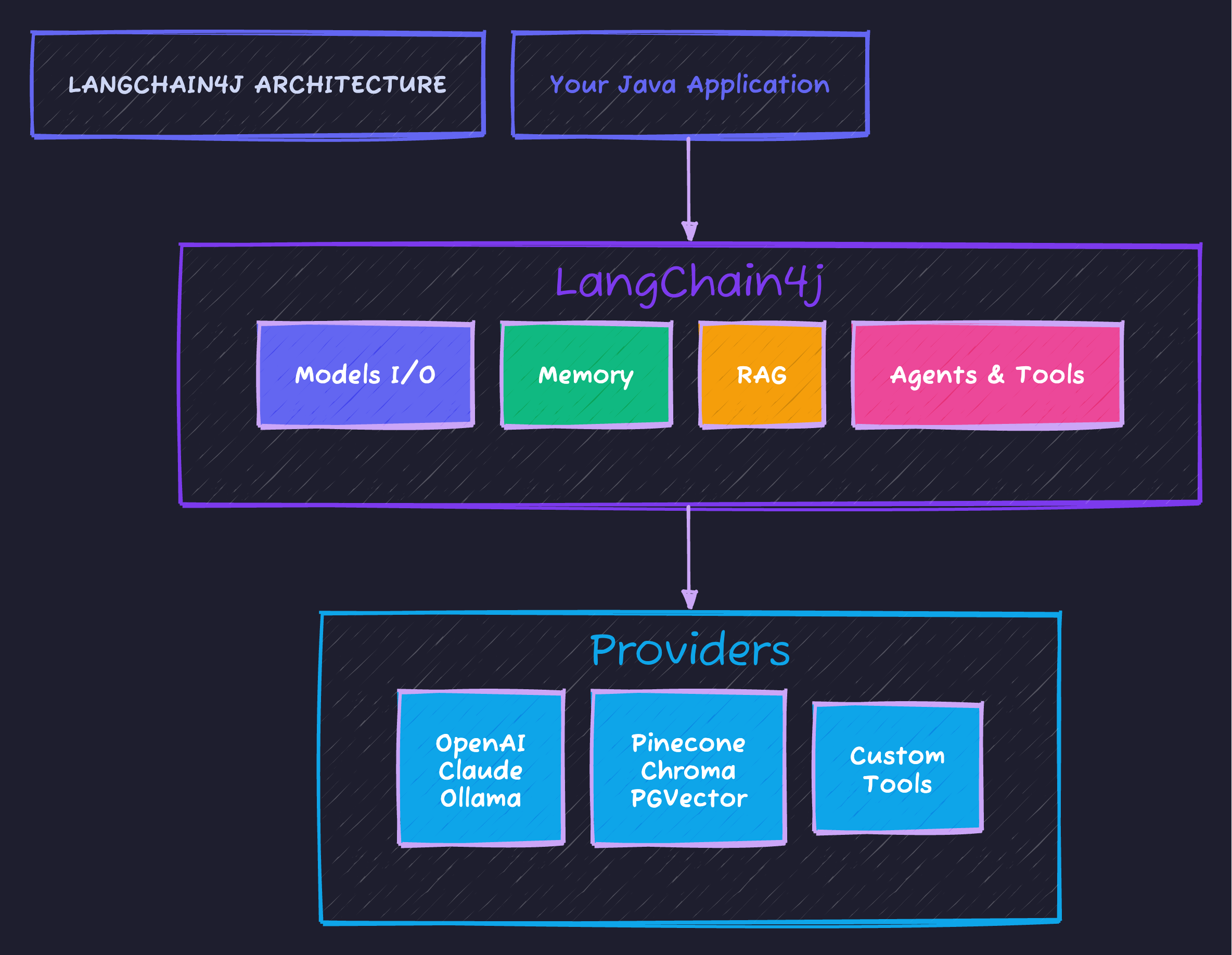
The framework connects your application to multiple providers through a consistent API - swap between OpenAI, Claude, or local Ollama without changing your business logic.
Supported Providers
| Category | Providers |
|---|---|
| LLMs | OpenAI, Anthropic Claude, Azure OpenAI, Ollama, HuggingFace |
| Embeddings | OpenAI, all-MiniLM-L6-v2, Cohere |
| Vector Stores | Pinecone, Chroma, Milvus, PGVector, In-Memory |
| Document Loaders | Files, URLs, S3, databases |
Step-by-Step Setup
Dependencies
<dependencyManagement>
    <dependencies>
        <dependency>
            <groupId>dev.langchain4j</groupId>
            <artifactId>langchain4j-bom</artifactId>
            <version>0.35.0</version>
            <type>pom</type>
            <scope>import</scope>
        </dependency>
    </dependencies>
</dependencyManagement>

<dependencies>
    <!-- Core -->
    <dependency>
        <groupId>dev.langchain4j</groupId>
        <artifactId>langchain4j</artifactId>
    </dependency>

    <!-- OpenAI (or choose another provider) -->
    <dependency>
        <groupId>dev.langchain4j</groupId>
        <artifactId>langchain4j-open-ai</artifactId>
    </dependency>

    <!-- Embeddings for RAG -->
    <dependency>
        <groupId>dev.langchain4j</groupId>
        <artifactId>langchain4j-embeddings-all-minilm-l6-v2</artifactId>
    </dependency>
</dependencies>
Core Concepts
1. Models I/O - Talk to LLMs
// Create a chat model
ChatLanguageModel model = OpenAiChatModel.builder()
    .apiKey(System.getenv("OPENAI_API_KEY"))
    .modelName("gpt-4o")
    .temperature(0.7)
    .build();

// Simple generation
String response = model.generate("What is Spring Boot?");

// With prompt templates
PromptTemplate template = PromptTemplate.from(
    "Explain {{topic}} to a {{audience}} in {{style}} style."
);

Map<String, Object> vars = Map.of(
    "topic", "microservices",
    "audience", "Java developer",
    "style", "concise"
);

Prompt prompt = template.apply(vars);
String answer = model.generate(prompt.text());
2. Memory - Remember Conversations
// Create memory that keeps last N messages
ChatMemory memory = MessageWindowChatMemory.withMaxMessages(10);

// Or token-based memory
ChatMemory tokenMemory = TokenWindowChatMemory
    .withMaxTokens(1000, new OpenAiTokenizer("gpt-4o"));

// Use in conversation
memory.add(UserMessage.from("My name is Alex"));
AiMessage response1 = model.generate(memory.messages()).content();
memory.add(response1);

memory.add(UserMessage.from("What's my name?"));
AiMessage response2 = model.generate(memory.messages()).content();
// Response: "Your name is Alex"
3. RAG - Ground Responses in Your Data
This is where LangChain4j shines. Build a system that answers questions from your documents:
// Step 1: Load documents
Document doc = FileSystemDocumentLoader.loadDocument("company-docs.pdf");

// Step 2: Split into chunks
DocumentSplitter splitter = DocumentSplitters.recursive(300, 50);
List<TextSegment> segments = splitter.split(doc);

// Step 3: Create embeddings
EmbeddingModel embeddingModel = new AllMiniLmL6V2EmbeddingModel();
List<Embedding> embeddings = embeddingModel.embedAll(segments).content();

// Step 4: Store in vector database
EmbeddingStore<TextSegment> store = new InMemoryEmbeddingStore<>();
store.addAll(embeddings, segments);

// Step 5: Query
String question = "What is our refund policy?";
Embedding questionEmbedding = embeddingModel.embed(question).content();

List<EmbeddingMatch<TextSegment>> matches = store.findRelevant(
    questionEmbedding,
    3,    // top 3 results
    0.7   // minimum similarity score
);

// Step 6: Build prompt with context
String context = matches.stream()
    .map(m -> m.embedded().text())
    .collect(Collectors.joining("\n\n"));

String prompt = """
    Answer based on this context:
    %s

    Question: %s
    """.formatted(context, question);

String answer = model.generate(prompt);
4. Agents & Tools - Let AI Take Actions
Give your LLM the ability to call functions:
// Define tools
public class CalculatorTools {

    @Tool("Adds two numbers together")
    public int add(int a, int b) {
        return a + b;
    }

    @Tool("Multiplies two numbers")
    public int multiply(int a, int b) {
        return a * b;
    }

    @Tool("Gets current date and time")
    public String currentDateTime() {
        return LocalDateTime.now().toString();
    }
}

// Create AI Service (Agent)
interface MathAssistant {
    String chat(String message);
}

MathAssistant assistant = AiServices.builder(MathAssistant.class)
    .chatLanguageModel(model)
    .tools(new CalculatorTools())
    .chatMemory(MessageWindowChatMemory.withMaxMessages(10))
    .build();

// AI will use tools automatically
String result = assistant.chat(
    "What is 42 multiplied by 17, then add 100?"
);
// AI calls multiply(42, 17), then add(714, 100)
// Answer: "42 × 17 = 714, then 714 + 100 = 814"
Building a Complete RAG Application
Let’s build a document Q&A system:
@Service
public class DocumentQAService {

    private final ChatLanguageModel model;
    private final EmbeddingModel embeddingModel;
    private final EmbeddingStore<TextSegment> store;

    public DocumentQAService() {
        this.model = OpenAiChatModel.builder()
            .apiKey(System.getenv("OPENAI_API_KEY"))
            .modelName("gpt-4o")
            .build();

        this.embeddingModel = new AllMiniLmL6V2EmbeddingModel();
        this.store = new InMemoryEmbeddingStore<>();
    }

    public void indexDocument(Path filePath) {
        Document doc = FileSystemDocumentLoader.loadDocument(filePath);

        DocumentSplitter splitter = DocumentSplitters.recursive(500, 100);
        List<TextSegment> segments = splitter.split(doc);

        List<Embedding> embeddings = embeddingModel.embedAll(segments).content();
        store.addAll(embeddings, segments);
    }

    public String askQuestion(String question) {
        // Find relevant context
        Embedding questionEmbedding = embeddingModel.embed(question).content();
        List<EmbeddingMatch<TextSegment>> matches = store.findRelevant(
            questionEmbedding, 5, 0.6
        );

        if (matches.isEmpty()) {
            return "I couldn't find relevant information in the documents.";
        }

        String context = matches.stream()
            .map(m -> m.embedded().text())
            .collect(Collectors.joining("\n---\n"));

        String prompt = """
            You are a helpful assistant. Answer the question based ONLY on
            the provided context. If the answer isn't in the context, say so.

            Context:
            %s

            Question: %s

            Answer:
            """.formatted(context, question);

        return model.generate(prompt);
    }
}
Spring Boot Integration
LangChain4j has official Spring Boot starters:
<dependency>
    <groupId>dev.langchain4j</groupId>
    <artifactId>langchain4j-spring-boot-starter</artifactId>
</dependency>
<dependency>
    <groupId>dev.langchain4j</groupId>
    <artifactId>langchain4j-open-ai-spring-boot-starter</artifactId>
</dependency>
# application.yaml
langchain4j:
open-ai:
api-key: ${OPENAI_API_KEY}
chat-model:
model-name: gpt-4o
temperature: 0.7@RestController
public class ChatController {
private final ChatLanguageModel model; // Auto-injected
public ChatController(ChatLanguageModel model) {
this.model = model;
}
@PostMapping("/chat")
public String chat(@RequestBody String message) {
return model.generate(message);
}
}LangChain4j vs Spring AI
| Feature | LangChain4j | Spring AI |
|---|---|---|
| Focus | LLM app framework | Spring ecosystem integration |
| Provider support | Extensive (15+) | Growing |
| RAG tools | Built-in | Built-in |
| Memory | Multiple strategies | Basic |
| Agents/Tools | Full support | Via MCP |
| Spring integration | Starter available | Native |
Our recommendation:
- Use LangChain4j for complex AI apps with agents, chains, tools
- Use Spring AI if you need MCP integration or prefer Spring-native
Common Pitfalls
| Pitfall | Solution |
|---|---|
| Token limits exceeded | Use TokenWindowChatMemory |
| Slow embedding | Use local model (all-MiniLM-L6-v2) |
| Poor RAG results | Tune chunk size (300-500 tokens) |
| High API costs | Use Ollama for development |
Code Repository
Complete examples:
- Basic chat
- RAG with PDF documents
- Agent with custom tools
- Spring Boot integration
GitHub: techyowls/techyowls-io-blog-public/langchain4j-guide
git clone https://github.com/techyowls/techyowls-io-blog-public.git
cd techyowls-io-blog-public/langchain4j-guide
export OPENAI_API_KEY=your_key
./mvnw spring-boot:run
Further Reading
- Spring AI MCP Guide - Alternative approach
- Java 21 Virtual Threads - Scale your AI apps
- LangChain4j Docs
Build AI apps in Java, ship to production. Follow TechyOwls for more practical guides.
Frequently Asked Questions
What is LangChain4j and how is it different from LangChain?
Does LangChain4j work with Spring Boot?
What LLM providers does LangChain4j support?
How do I implement RAG with LangChain4j?
Moshiour Rahman
Software Architect & AI Engineer
Enterprise software architect with deep expertise in financial systems, distributed architecture, and AI-powered applications. Building large-scale systems at Fortune 500 companies. Specializing in LLM orchestration, multi-agent systems, and cloud-native solutions. I share battle-tested patterns from real enterprise projects.
Related Articles
Spring AI + MCP: Build AI Agents That Actually Do Things
Connect your Spring Boot app to external tools, databases, and APIs using Model Context Protocol. Complete guide with working code.
Spring BootSpring AI Structured Output: Parse LLM Responses into Java Objects
Convert unpredictable LLM text into type-safe Java objects. BeanOutputConverter, ListOutputConverter, and custom converters explained.
Spring BootSpring Boot 3 Virtual Threads: Complete Guide to Java 21 Concurrency
Master Java 21 virtual threads in Spring Boot. Learn configuration, benchmarks, pitfalls, and scale from thousands to millions of concurrent operations reliably.
Comments
Comments are powered by GitHub Discussions.
Configure Giscus at giscus.app to enable comments.